Communicate Reflection

iNacol, the International Association for Online Learning, publishes Standards for Quality Online Teaching.

Consider the following standards:

Standard C: The online teacher plans, designs, and incorporates strategies to encourage active learning, application, interaction, participation, and collaboration in the online environment.

Standard D: The online teacher promotes student success through clear expectations, prompt responses, and regular feedback.

Standard E: The online teacher models, guides, and encourages legal, ethical, and safe behavior related to technology use.

Standard J: The online teacher interacts in a professional, effective manner with colleagues, parents, and other members of the community to support students’ success.

Standard K: The online teacher arranges media and content to help students and teachers transfer knowledge most effectively in the online environment.

Answer in a complete paragraph response: How has the Communicate module prepared you to meet each standard listed above? Link to or provide specific examples from your work in Communicate. What strategies will you take away from the Communicate module and apply to your teaching?  What lessons were most beneficial for you??

The Communicate Module helped me prepare for Standard C by working on Communicate 2 – Synchronous Sessions. This assignment helped me think about how I could possibly take some of my in class assignments and translate them to online or digital assignments. The tools I was able to explore will help me with synchronous sessions in the future.

The Communicate Module helped me prepare for Standard D by working on Communicate 3 – Digital Feedback. This assignment helped me to think about various ways to provide digital feedback to students, as I will not get to see them on a day to day basis.

The Communicate Module helped me prepare for Standard E by working on Communicate 1 – Communication Laws. This assignment helped me to better understand the rules that govern the way I should practice teaching with online use. This will help me be a model digital citizen.

The Communicate Module helped me prepare for Standard J by working on Communicate 2 – Ongoing Communication. This assignment helped me to understand the need to communicate with all stakeholders, and to make sure not to neglect any party.

The Communicate Module helped me prepare for Standard K by working on Communicate 2 – Synchronous Sessions. This assignment also helped with this standard as it allowed me to see the platforms in which synchronous learning can occur. This lesson was by far the most helpful in this module as I was able to explore synchronous learning.
Communicate 3 – Evaluation Methods

Reflect: Take a moment and return to the resources provided in this section of the Communicate skill and the ongoing exploration of communication practices in the online environment.

Answer: How do communication practices in the online environment correlate to effective feedback? Why is authentic feedback important for online learners? In what ways might an instructor enrich a student’s online experience through feedback?

The communication and feedback you provide students is of vital importance, since you don not get the face to face conversation everyday that you would in a conventional classroom. While you can hold office hours, where you meet with students in a synchronous manner, the majority of feedback will happen in another manner. Therefore, this needs to be quality and needs to be well thought out in its presentation. Students need to feel heard by their instructor and by their peers, and it is our jobs to make sure they feel this way.

Communicate 3 – Rubrics

Create: Utilizing one of the resources discussed in this lesson, create a rubric that integrates specific criteria for an assignment and also affords the instructor ample commentary on the student’s product. Make the rubric available in a post in your blog.

Post in your blog: The rubric you created, along with an explanation of the rubric.

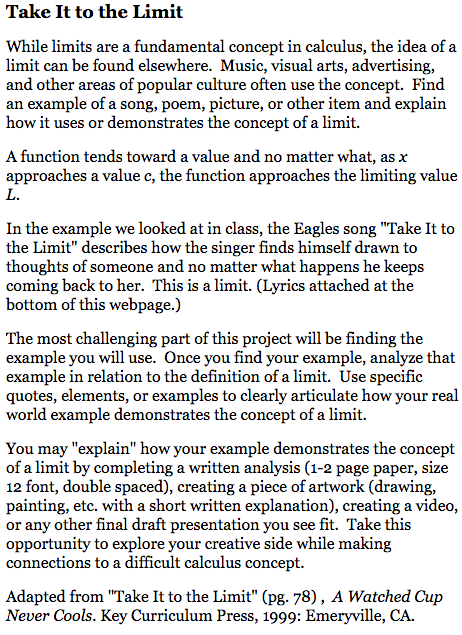
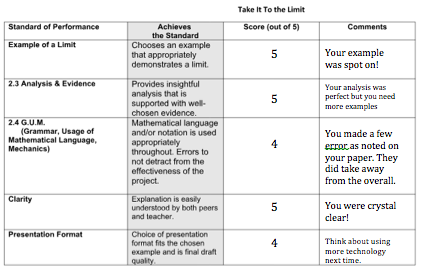
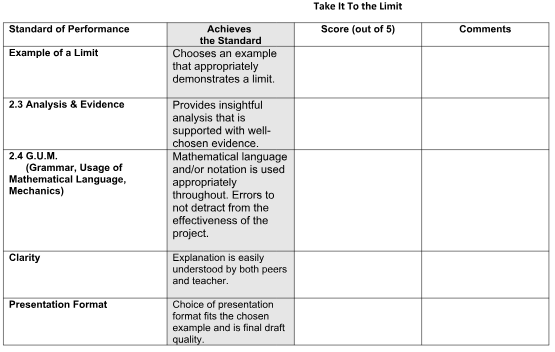
This rubric was used for a project in Calculus, where students has to find a real world example of a limit. The rubric evaluates the student on five areas of the project and allows a section for written feedback. The rubric is presented when the project is given so that the expectations for the project are clear.

Communicate 3 – Digital Feedback

Create: Using the examples above as a point of reference, create three original digital resources that could be utilized when evaluating student work. Then discuss in your blog how these resources would enhance the level of specific feedback offered to students. 

Answer: How do the resources you created would enhance the level of specific feedback offered to students?

Post: Place the three digital resources that were created in your blog.

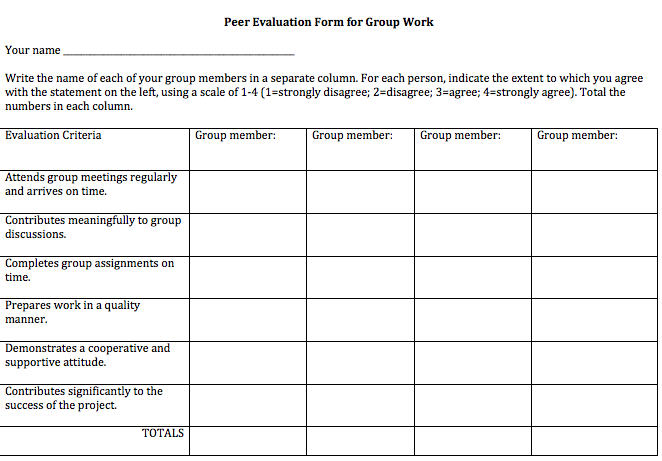
1. Group Project Peer Feedback: When assigning a group project I always ask group members to provide feedback to their peers. This provides learning on the subject matter, but also how they can function better in a group.

2. Individual feedback: This can take many forms, but they most common is the virtual form of a sticker, the meme. This is simply to say well done and make a student smile.

3. Whole class feedback: When common mistakes are made I like to link articles that will point students in the right direction, or give an online the assignment that targets the specific standards students are missing.

https://magoosh.com/hs/ap-calculus/2017/ap-calculus-ab-mistakes-avoid/

deltamath.com

Communicate 3 – Feedback

Create: Choose a standards-based area of study and create an assignment. Then create a method for assessing student work utilizing one of the mediums discussed in this lesson. Ensure the tool demonstrates an instructor’s employment of effective feedback.

Methods of Feedback: 

  • Audio Commentary
  • Rubrics
  • Traditional Written Feedback
  • Discussion Forums
  • Links to additional resources

Post: The student assignment you created from above, as well as the method of assessment. In addition, create an artifact showing the feedback method(s) discussed in this lesson.

Communicate 2 – Synchronous Sessions

Reflect: Reflect upon the importance of utilizing a synchronous session to “create a true classroom culture” online.

Answer: How does integrating synchronous learning sessions within the online environment assist in developing a learning community for students? Discuss this question at length in your blog.

Create:  An outline or lesson plan of a 30 minute synchronous session which you would facilitate.  What activities would you include?  What transitions are needed? How might you use the session as a formative assessment? How would your session build a learning community among your students?

A synchronous learning session can make an online class feel more like a “real” classroom environment, by creating relationships between the student and teacher and also between the students. Within the relationship between the teacher and student, a synchronous session can let the teacher know exactly what each student is having trouble with, which might not happen without these sessions. These session also can create more authentic engagement for the students, whereas without them, they might just be going through the motions.

Lesson Plan:

Students will have watched “One-Sided Limits” PPT with Commentary prior to session.

Session will begin with a Q&A on the PPT and Homework they have completed (about 10 minutes).

I will then present an introduction to Two- Sided Limits (about 20 minutes).

I will be able to use the session as a formative assessment through the Q&A, as it will become apparent who watched and completed their homework, as the students will not be able to participate if they have not. The session will build a learning community among students by creating interaction, as I would encourage student who know the answer to another students question to directly answer them.

Communicate 2 – Discussions

Answer: 

1) What role or purpose do discussion forums serve in the online classroom and are they effective? 

2) How do discussion forums function as a teaching tool? 

3) How could they be used effectively and ineffectively? 

4) What are some best practices for facilitating forums online?

The purpose of the discussion forum is to create classroom discussion. They can be effective in creating collaboration amongst students in the online classroom where it would not have existed otherwise. However, unlike a normal discussion, students can truly put thought into their responses as they are not immediate.

In order for discussion forums to function effectively, students must be made aware of the rules and expectations. As long as these are followed, the forum will function properly. However, if they are not observed, the forum can become ineffective very quickly.

Some Best practices would be: (1) Respond to the first thread of all student responses and ensure that the post addresses the essential elements; (2) Highlight selections from the prompt, reading, or thematic focus of the student’s response in the initial feedback; (3) Integrate audio commentary in the response; (4) Link to external resources, readings, or websites for further study; and (5) Rely on the Socratic Method in all Discussion Forums.

Communicate 2 – News Items

Answer: As an online instructor, how do you plan to incorporate news items and announcements? What resources would you reference to format news items?

Create: An example of a News Item. If it includes a video or interactive, please include the link or, better yet, use an embed code.

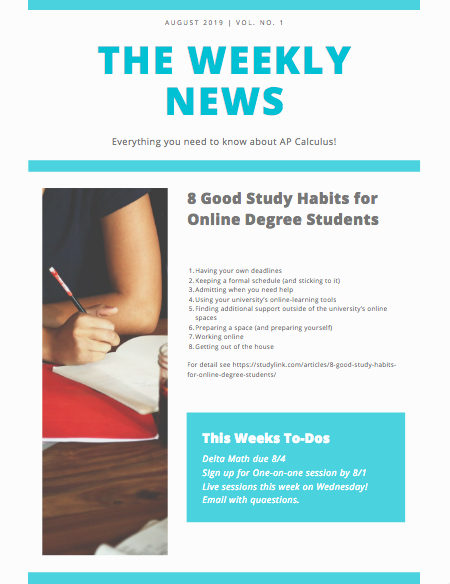
I plan to incorporate weekly announcements, articles, and other important information as news for my students, mostly weekly, but some more often. I would use a newsletter for weekly news (like here I have used a free newsletter from vengage.com) for other announcement I will use remind.com for small text blasts, and I am sure I will learn others over time.

Communicate 2 – Homepages

Reflect: Consider the bulletin board examples in this lesson. Think about the variety of information shared in the bulletin board examples.  What information might you share as an online instructor through your classroom bulletin board? 

Answer: What information might you share as an online instructor through your classroom bulletin board? 

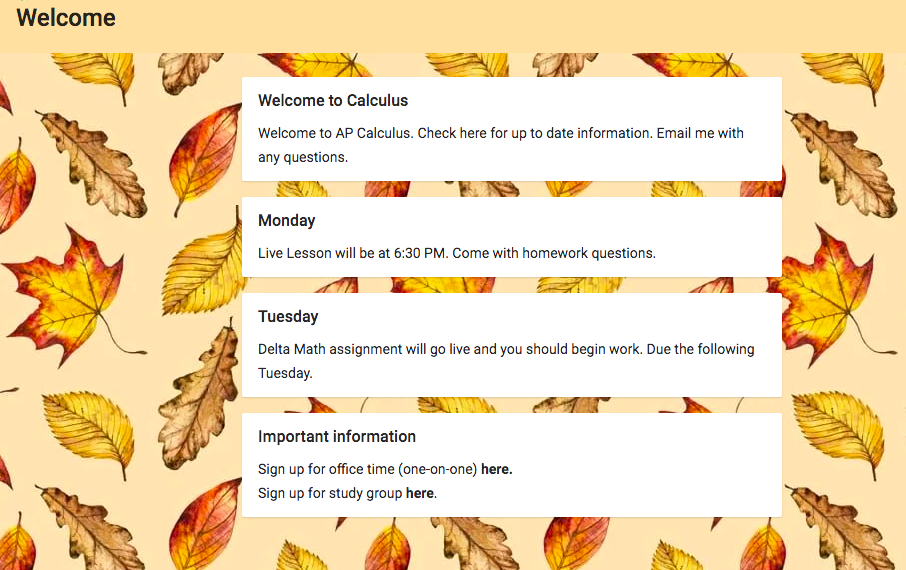
Create:  Create a sample Bulletin Board, which is student-centered, innovative, and adheres to the guidelines deliniated in this lesson. Have fun and be creative! Once completed, take a screenshot of the bulletin board and post the screenshot in your blog.

Communicate 2 – Ongoing Communication

Creating a collaborative online community among  stakeholders is an essential part of all virtual instruction programs and best practices.

Reflect: Think about the examples provided throughout this lesson. Identify two highly effective methods of communicating with stakeholders. Utilizing the resources outlined, create an artifact for each of the two identified highly effective methods of communicating with stakeholders. These two artifacts should be included in your blog. Ensure these products are creative, informative, and adhere to FERPA guidelines.

Post: Two artifacts, one for each of the identified highly effective methods of communicating with stakeholders.

Answer: Why is ongoing communication in the online classroom important? How does the newsletter differ from mandatory communications?

Artifact 1: My principals weekly newsletter:

https://www.smore.com/97bp6

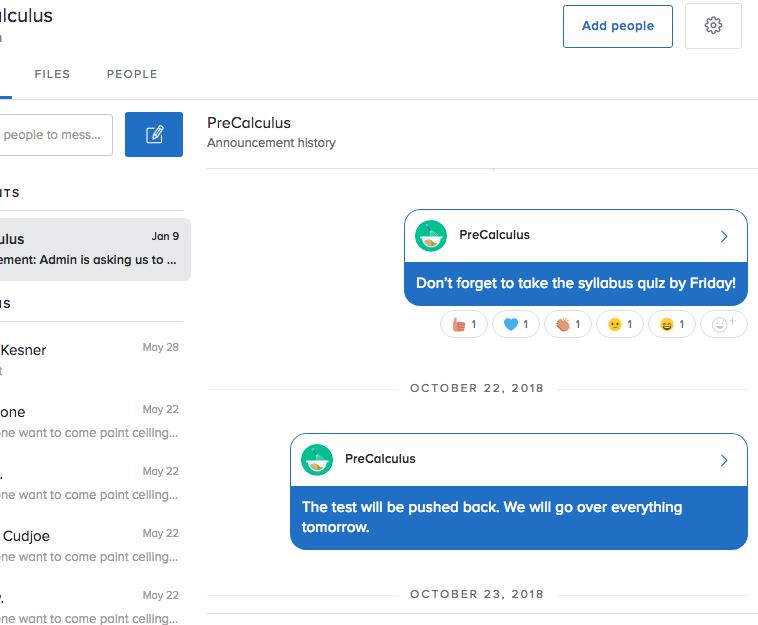
Artifact 2: Remind app- below is a snapshot of a few messages I have sent to students giving them a head up on information.