Create Reflection

iNacol, the International Association for Online Learning, publishes Standards for Quality Online Teaching.

Consider the following standards:

Standard B: The online teacher understands and is able to use a range of technologies, both existing and emerging, that effectively support student learning and engagement in the online environment.

Standard C: The online teacher plans, designs, and incorporates strategies to encourage active learning, application, interaction, participation, and collaboration in the online environment.

Standard E: The online teacher models, guides, and encourages legal, ethical, and safe behavior related to technology use.

Standard K: The online teacher arranges media and content to help students and teachers transfer knowledge most effectively in the online environment.

Answer in a complete paragraph response: How has the Create module prepared you to meet each standard listed above? Link to or provide specific examples from your work in Create. What strategies will you take away from the Create module and apply to your teaching?  What lessons were most beneficial for you?

The Create Module helped me prepare for Standard B by working on Create 2 – Web Tools for Differentiation of Student Assessment. This activity made me come with different ways to assess student performance and in turn engage students. Engaging students has to be much more than a multiple choice test.

The Create Module helped me prepare for Standard C by working on Create 1- Content Map. This is an invaluable to for planning a course or a unit. It can also work for a student to help fill out to think out a process. I have not used a content map before and going through this process was very helpful.

The Create Module helped me prepare for Standard E by working on Create 3 – Open Educational Resources. Understanding how something becomes an open educational resource and the different licenses helps me create an learning environment that follows rules and seeks to model the right behavior.

The Create Module helped me prepare for Standard K by working on Create 4 – Aggregating Lesson Material. Thinking through how the learning environment is set up and the ease of use for the student really helped throughout this module and will benefit my teaching.
Create 2 – Web Tools for Differentiation of Teacher Instruction

Create: Select one of the web tools mentioned in Create and build a new learning focused tool to differentiate instruction.

Artifact: Link to your created learning tool or take a screenshot and post in your blog.

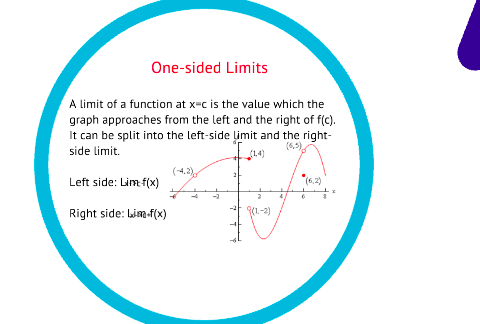
I created a Prezi the will present information on limits to students for the first time. I am including a screenshot below as the actual version needs a signin by a student on our school sight to access it. Prezi is a great tool not only to present information, but also for students to use to convey information. This presentation would be linked on my site for students to access to review what they might not have understood that day in class.

Create 4 – Build Portable Learning Objects

Create: Using your lesson topic, build two high quality, reusable learning objects.

Artifact: Link to the two high quality, reusable learning objects built by you.

Answer:What is the intended use of your learning objects?  How might the objects be used in an online or blended classroom?

The Quizizz is a learning object created for student to self test their knowledge of forces before an assessment. This is a great tool for any teacher as it can be used individually or live as a class. You can set it up to see students progress to know who needs extra help, or students can complete this anonymously. You can make this live and create a competition, which students seems to really like.

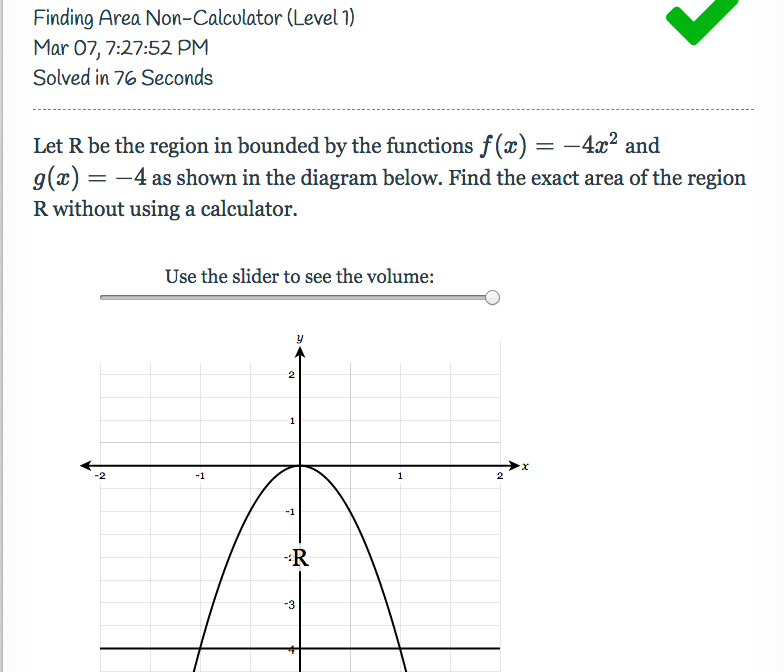
Delta Math is a learning object used as a homework assignment. I cannot provide the link to the actual object since you have to be one of my students to have access, so I have added a picture below. The reason that this program is beneficial is that if a student is having trouble with the problem, they can watch a step by step video on how to solve the problem and then solve one similar to it. The best part is that this is free.

Create 4 – Learning Object Authoring Tools

Research: Based on an understanding of learning object authoring tools, locate two learning object authoring tools (free or fee-based).  Link to the tools in your blog.

Answer: How might each tool be used in an online classroom? What features should an online teacher look for in a learning object tool?

PhET can be uses to simulate math and science concepts that can be abstract without a demonstration. These simulations allows students to “play” with materials that would oftentimes be hard to come by in an actual classroom. This tool is free to use from the University of Colorado. The site also come with tips on how to best use their simulations.

GeoGebra is a website that contains may learning tools. The most useful, in my opinion, is the math apps. Much of mathematics is abstract ideas that students have a difficult time, under the best circumstances, visualizing. GeoGebra, and its contributors, have brought these concepts to life. You can also use the website to graph and all of this is free.

Create 4 – Aggregating Lesson Material

Research: As discussed throughout the quest, collecting or curating learning objects, resources, and learning material enriches the e-learning environment. Research and identify two tools that can be used to aggregate and present learning material, other than the two mentioned in the lesson. Link to the two tools in your blog.

Answer: Thinking about instructional design, how does each tool benefit the learner by aggregating and presenting material in a cohesive manner? Are there drawbacks to the tools you researched?

Canvas is a free LMS that has so many features its hard to believe its actually free. Navigation is easy though the course for the student and is just as easy to set up for the teacher. The have a feature called Arc, that helps to make videos more interactive. Differentiation lies in what they call Mysterypath, where the content is released to the student based on performance. They have professional looking interface and it is easy to export/import content. Most of all I think all of their bells and whistles will help to engage learners.

Schoolology is a great LMS to use for differentiation of instruction, individualized learning, assessments, and more. Allowing students options to guide their learning and using it for Blended Learning is beyond helpful. The platform can seem a bit overwhelming at first but gets easier with use. There is a free basic package, but is you want more of the features you’ll have to pay for those. The visual appeal is good and it looks professional.

Create 3 – Locating Resources

Research: Locate one online image designated as an open educational resource. Locate one online text object designated as an open educational resource. Locate one online video designated as an open educational resource.   

Artifact: Post the three links to the resources located above and give proper citations.

1. Online Image

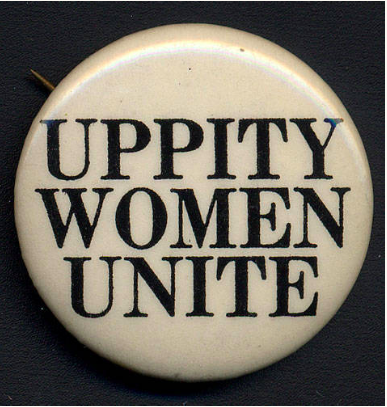
Equal Rights Amendment. (n.d.). Retrieved July 21, 2019, from Digital Public Library

of America website: https://dp.la/primary-source-sets/the-equal-rights-

amendment/sources/1201

2. The Constitution of the United States

The Unites States Constitution. (n.d.). Retrieved July 21, 2019, from https://constitutionus.com/ 

3. Youtube- I Have A Dream Speech

Martin Luther King- I Have A Dream Speech [Video file]. (2011, January 20). Retrieved from 
     https://www.youtube.com/watch?v=smEqnnklfYs

Create 3 – Open Educational Resources

Research: Spend time perusing the vast amount of open educational resources and examining the different usage rights regarding creative commons items.

Create: In your blog post, create a definition of open educational resources.

Answer: What are the various Creative Commons licenses one may encounter when searching for these resources?

An open educational resource is one that exists in public domain and has either been released under a open license or is a creative work that has entered the public domain.

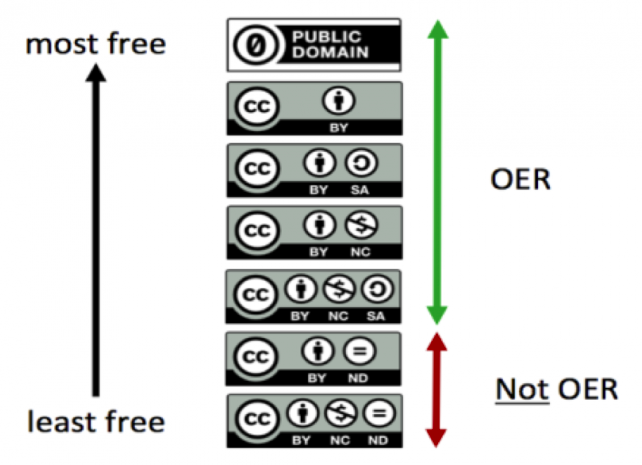
The various licenses are shown in the graphic above and will be explained from top to bottom:

  1. You can distribute, remix, tweak, and build the work, even commercially, as long as you give the author credit.
  2. You can remix, tweak, and build upon the work even for commercial purposes, as long as you give the author credit and license the new creations under the identical terms.
  3. You can reuse the work for any purpose, including commercially, you must credit the author and the adapted for cannot be shared.
  4. You can remix, tweak, and build upon the work non-commercially, and although the new works must also acknowledge the author and be non-commercial, they don’t have to license their derivative works on the same terms.
  5. You can remix, tweak, and build upon the work non-commercially, as long as you give credit to the author and license the new creations under the identical terms.
  6. You are only allowed to download works and share them with others as long as you credit the author, but you can’t change them in any way or use them commercially.

Create 2 – Web Tools for Differentiation of Student Assessment

Create: Using your lesson topic, create an assessment that allows students to produce a summative assessment product using web tools. Isolate one web tool that aligns with differentiation and student assessment. Post the tool to your blog. Create detailed instructions explaining to students the assessment requirements. Then, create a sample product that uses the web tool to guide your students.

Artifact: Link to the sample product in your blog.

Answer:  How do you plan to use the tool effectively with students? How does the tool differentiate the assessment? Explain.

The link to my product is: https://drive.google.com/file/d/1wRJcut-VW0lDqSHw88IXSXRb5DGRboRk/view?usp=sharing

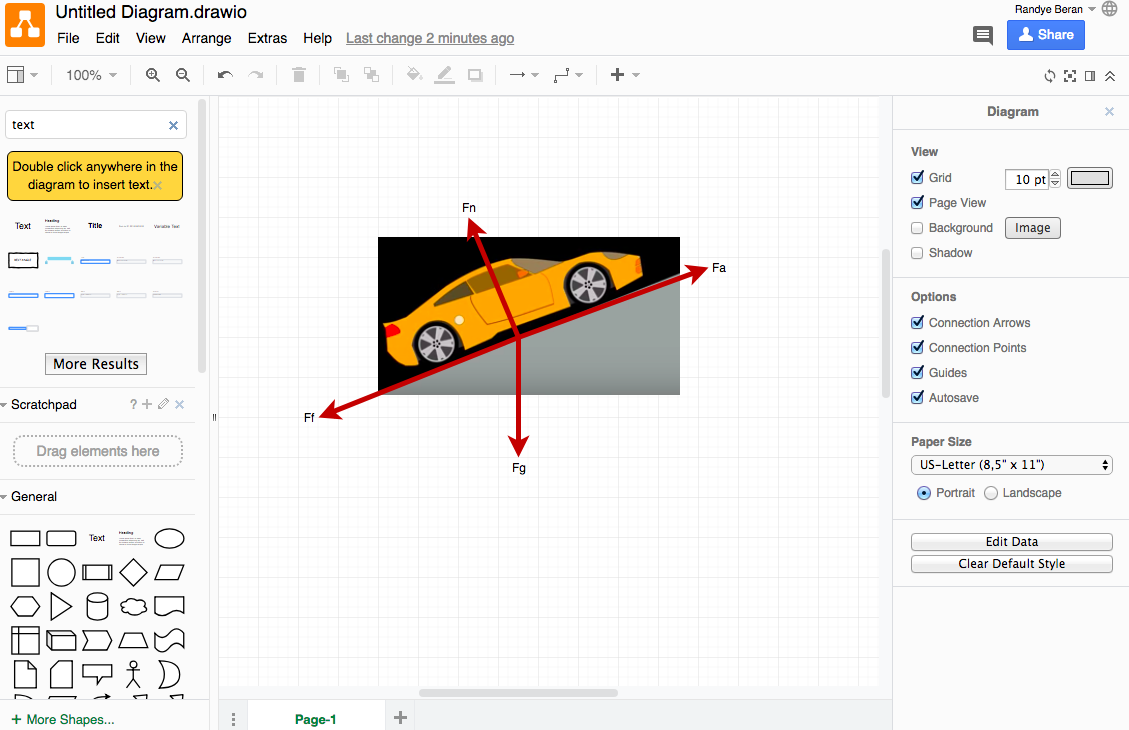
The tool I used was draw.io in order to have students demonstrate their ability to draw free-body diagrams. The student can copy the image (as I did), or create a box (as many do) to represent the object. From here they can show their calculations. This is a step that many student (on paper) chose to skip. Having this tool reinforces the importance of the FBD and allows certain students to go above and beyond, which differentiates the assessment. It is also much better than a multiple choice assessment.

Create 2 – Explore Web Tools

Research – Find five instructional web tools that offer a variety of opportunities for learners.  Link to each web tool considered in your blog.

Answer – What is the intended use for each tool? How might you use each tool in online teaching? How might a student use the tool? Is there a cost associated with the tool?

1. Peergrade “is a free online platform to facilitate peer feedback sessions with students.” I could set up an assignment, with a rubric, and allow peers to provide feedback following the rubric. This feedback spurs discussion and brings students further than if they were just completing an assignment alone.

2. Nearpod allows an instructor to “easily importing existing lessons (pdfs, jpegs, ppts) and adding interactive features such as Virtual Field Trips, 3D Objects, Quizzes, Polls, Open Ended Questions + more!” This tool makes presentations far more interactive. There is a free account but there are more features available with a paid account. Some districts offer this with your signin.

3. LiveBinders allows students to create “online binders you can combine all of your cloud documents, website links and upload your desktop documents – to then easily access, share, and update your binders from anywhere.” This is a great way for students to organize for a course and be able to share their information with anyone. Livebinder is free to use.

4. Padlet is “an online virtual “bulletin” board, where students and teachers can collaborate, reflect, share links and pictures, in a secure location.” Live binder can be set up by the instructor for use as a group or a student can use this for personal use. Padlet is free to use.

5. Sutori is a “collaborative presentation tool for the classroom for all age groups and content areas. It provides the ideal canvas for assignments and lesson plans.” This is a great way to present material and best part is its free.

Create 1 Appearance

Research: Find ten instructional websites that offer a variety of opportunities for learners.  Link to each website considered in your blog.

Answer:  Which sites exemplify sound design ideals?  Why?  Which sites do not adhere to the design elements discussed in this lesson? Why?

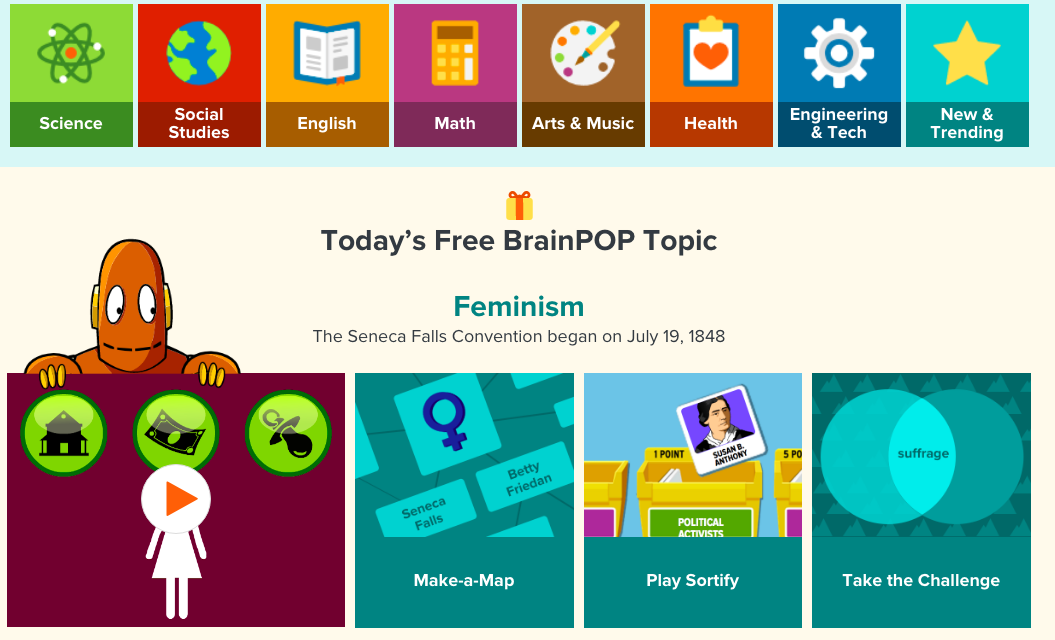
Artifact: Provide a screenshot of 2 websites considered to offer a compare and contrast of design elements.

Ten Websites:

  1. Delta Math
  2. PhET
  3. NASA
  4. Gizmos
  5. Khan Academy
  6. Desmos
  7. BrainPOP
  8. cK-12
  9. Cuethink
  10. Geogebra

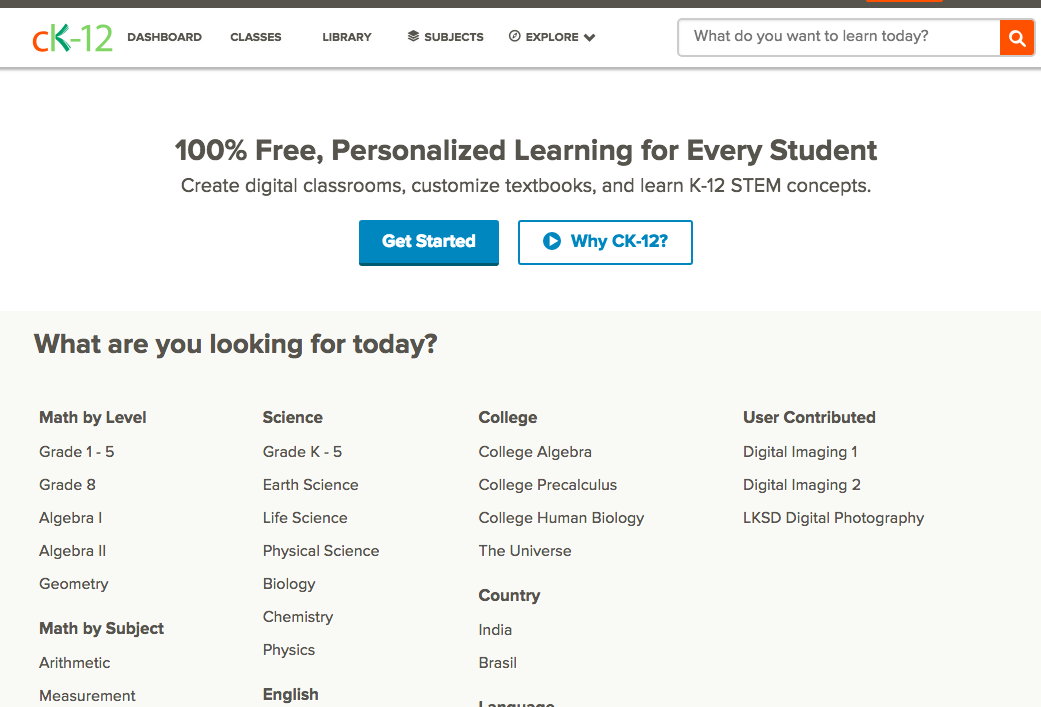
cK-12 follows all the rules. The site is easy to read, as the background is white, and all of the information is easy to locate. Students do not have to look very far, as they just have to type something into the “what do you want to learn today?” tab to be taken to various resources to help them. There is good contrast in colors, so even those that are colorblind would not have a problem.

BrainPOP, while a great site, violates many of the rules. However, I can see how the colorful choices would attract children. However, many of the pages are very busy and distracting, and some of the boxes have text that lacks contrast.